
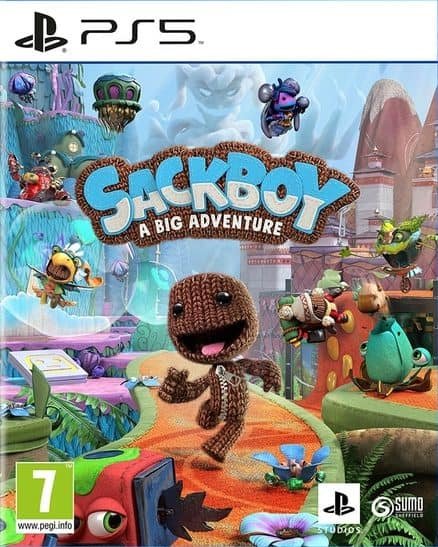

Sackboy A big adventure PS4 & PS5

From 12,00

  • Digital version of the game for PS4 and PS5.
  • It's not a code.
  • It's very simple: You will receive an email and a password, and you will add an account to your PS5.
  • Completely legal.
  • Languages: Spanish, English, French, Italian, German
  • Size: 50GB.
  • Optional in-game purchases
  • Optional online game
💡 Popular among gamers
💡 For a perfect setup: Make sure you choose your preferred account type. You'll receive access automatically and instantly.
Earn 18 points. This is equivalent to 1,20
🛡️ Lifetime warranty anti-padlock.
🛠️ Ongoing technical support including.
SKU N/A Categories ,

With this product you can download both the digital version for PS4™ and the digital version for PS5™ of this game.

Asume desafíos mientras exploras un mundo artesanal y te sumerges en su universo con unas mecánicas de juego muy divertidas. Enfréntate en solitario a una increíble aventura repleta de peligros o forma equipos de 2 a 4 aventureros y pásatelo en grande mientras colaboráis para superar los obstáculos. ¿Podrás salvar Mundo Artesano del malvado Vex y su horripilante Patasarribador… y convertirte en el legendario Caballero de la Puntada? • UNA PELIGROSA AVENTURA DE PLATAFORMAS Explóralo todo con los numerosos e increíbles movimientos de Sackboy para superar los desafíos, enemigos y sorpresas. • MULTIJUGADOR COOPERATIVO, CAÓTICO Y DIVERTIDO Asume desafíos en partidas en grupo locales y online*. Se puede jugar en grupo entero e incluye niveles solo disponibles en el modo cooperativo. • CON RELLENO, PUNTADAS Y CREMALLERA. Sackboy vuelve a lo grande, con más movimientos y dispositivos, en una aventura en 3D desarrollada en un mundo nuevo y familiar a la vez.
🟦 PLAYSTATION 5 INSTALLATION GUIDES
➔ Main Account Tutorial (Play from your profile) +
  1. Add a new user to your console (Add user > Get started). Log in manually with the received data.
  2. If it asks for a verification code (2FA), request it in our chat. tawk.to or Telegram.
  3. ⚠️ VERY IMPORTANT: When the system asks you about "Console Sharing and Offline Game Sharing", select ENABLE. (If it doesn't ask you, enable it yourself in Settings > Users and Accounts > Other).
  4. Go to the Games Library, start the game download, log out, and Go back to YOUR personal profile to play for life.
➔ Secondary Account Tutorial (Play from the provided profile) +
  1. Add a new user to your console (Add user > Get started) and log in with the email and password provided.
  2. ⚠️ VERY IMPORTANT: When the system asks you about "Console Sharing and Offline Game Sharing," select DO NOT ENABLE or DEACTIVATE. The account must remain as secondary.
  3. Go to the Game Library and start downloading the purchased game.
  4. To play: You must always log in to this new profile and have an internet connection. You will play and accumulate your trophies and saved games within this exclusive profile.
🟩 XBOX SERIES X/S INSTALLATION GUIDES
➔ Main Account Tutorial (Play from your profile) +
  1. Press the Xbox button on the controller, go to the tab on the right and select Add new. Enter the assigned data.
  2. In the login security settings, select the option «"Without barriers"».
  3. ⚠️ VERY IMPORTANT: Go to Settings > General > Personalization > My Home Xbox and select "Make this my home Xbox".
  4. Start downloading the game from your library, log out of your account, and Open your usual profile to start playing.
➔ Secondary Account Tutorial (Gameplay Method) +
  1. Press the Xbox button on the controller, go to the right, and click on Add new to enter the data we sent you.
  2. In the profile security settings, select the option «"Without barriers"».
  3. ⚠️ VERY IMPORTANT: Make sure this account is NOT active as your primary Xbox (Settings > General > Personalization > My primary Xbox).
  4. Download the game completely. **To play:** Log in with the game account we gave you, and without logging out, switch to your usual personal account. You can now play and save your progress as normal.
🟥 NINTENDO SWITCH INSTALLATION GUIDES
➔ Main Account Tutorial (Play offline and from your profile) +
  1. Go to Console Settings > User Profile > Register a User > Create a New User and link the Nintendo account we sent you.
  2. Log in to the Nintendo eShop using this newly created user account. Tap your avatar in the upper right corner, then go to Download again and click on the game cloud.
  3. Once the installation is complete, go to your Switch's main menu and open the game by selecting **YOUR personal user**. You don't need internet access to play.
  4. ⚠️ NOTE: Never delete the newly created user from the console; it is the one that validates the user license.
➔ Secondary Account Tutorial (Play online from the new profile) +
  1. Go to Console Settings > User Profile > Register a user and link the received data.
  2. Access the Nintendo eShop by selecting the game user. Click on the avatar in the upper right corner, then go to the section for Download again and download your title.
  3. ⚠️ USAGE REQUIREMENTS: To start and play this video game, you must always select the NEW profile provided and have the console permanently connected to the internet for license verification.